









How to Migrate Recurring Donors to a New System Without Breaking Billing
Migrating recurring donors means moving your regular givers, their payment authorisations and their giving history from one system to another, so the next scheduled payment collects on time from the right account and nobody is asked to sign up again. Done properly, most donors never notice it happened. Done carelessly, you find out three weeks later when the bank returns start arriving.
This guide is written for charities and membership organisations in Germany, Austria and Switzerland that collect regular gifts or member fees by SEPA direct debit or card, and that are weighing a move to a new CRM or billing platform. It covers what actually transfers, what needs real attention, and the order to do things in.
This is general information about payment schemes and migration practice. It is not tax or legal advice. Confirm specifics with your bank, your payment provider and your advisor.
A note on numbers
We went looking for a credible, published benchmark on how many recurring donors a charity typically loses during a system migration. We couldn’t find one from a named primary source. So this article doesn’t quote a figure. If a vendor shows you one, it’s fair to ask where it came from and how it was measured.
Why charities delay recurring donor migration
Ask a fundraising lead why the team is still on a system everyone complains about, and the honest answer is rarely price. It’s the regular givers.
Years of monthly donors and paying members, often the most loyal people the organisation has, sitting in one database. Nobody wants to be the person who moved them and lost a few hundred along the way. So the switch gets pushed to next quarter. Then the one after.
That caution makes sense. But a lot of it rests on a misunderstanding about where a recurring gift actually “lives”. Most of what keeps a monthly gift going isn’t held in your CRM. It sits with the payment scheme and the donor’s own bank, and those don’t change just because your software does.
What actually keeps a recurring gift running
A recurring gift depends on three separate things: the payment authorisation, the billing schedule, and the donor record. They behave very differently in a migration, so it helps to pull them apart.
| Element | What it is | Where it really lives | What a migration has to do |
| Payment authorisation | SEPA mandate or stored card credential | With the payment scheme, your PSP and the donor’s bank | Transfer or amend it correctly, and tell donors where required |
| Billing schedule | Amount, frequency, next collection date | In your current billing system | Rebuild it exactly in the new system |
| Donor record | Contact details, gift history, consents, receipts | In your CRM | Export completely, including history and opt-outs |
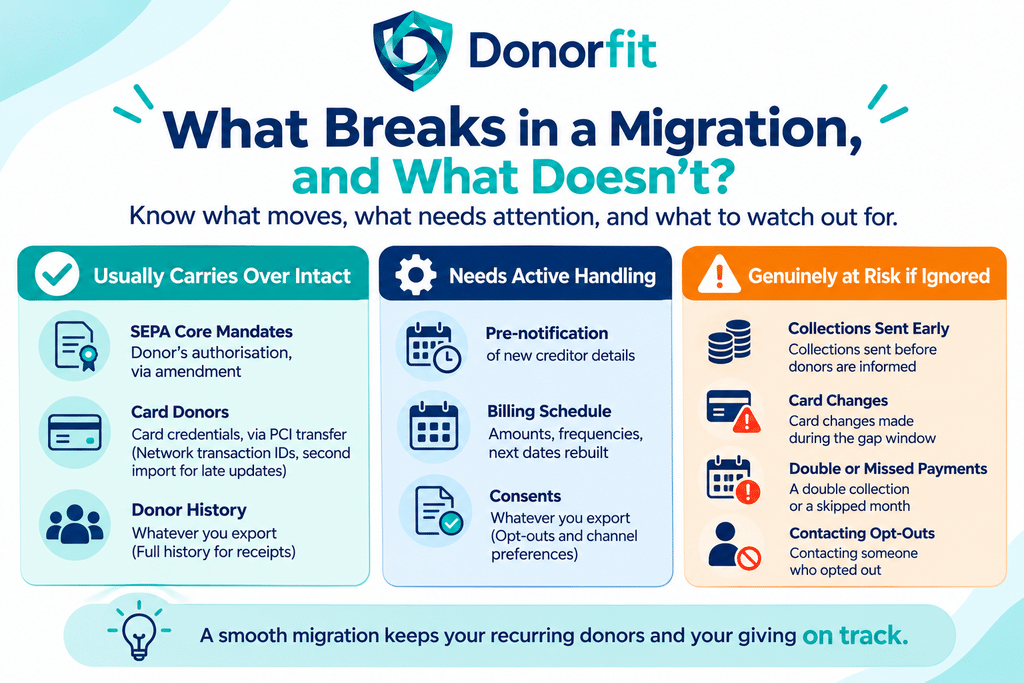
Most migration problems come from the second and third rows, not the first. The authorisation is the part people fear most, and it’s usually the hardest to break.
SEPA direct debit: the mandate usually survives the move
Under the SEPA Core scheme, a creditor can change its name, its Creditor Identifier or the mandate reference through a mandate amendment, without asking the donor for a new signature. ABN AMRO’s guide to Core amendments lists those three as creditor-initiated changes and says no new signed mandate is needed, unless the creditor wants to fully exclude the risk of a refund claim for an unauthorised transaction (ABN AMRO). Payment providers describe the same mechanism: an amendment updates the mandate data without interrupting the recurrence sequence (Lyra).
If all you’re changing is the bank account you collect into, it’s simpler still. ING points out that the creditor’s account isn’t part of the signed mandate, so switching it doesn’t trigger an amendment at all (ING).
What you do owe donors is notice. Summarising the EPC rules, Banco de Portugal explains that when the creditor’s identity changes, debtors don’t sign new mandates, but they must be informed fully and in good time before collections start, including any new Creditor Identifier and any new mandate reference (Banco de Portugal). GoCardless makes the same requirement of organisations moving mandates onto its platform: tell customers about the change of provider, any new mandate reference, and the old and new Creditor ID (GoCardless).
In practice, three things protect continuity:
Keep the original mandate reference and signature date in your export. Import tools check for them. Qonto’s mandate import, for example, rejects references over 35 characters and requires a valid past signature date (Qonto).
Send the pre-notification before the first collection on the new system, not after. A clear, friendly letter or email showing the new creditor name, identifier and reference heads off confused donors checking their bank statement.
Watch for corporate supporters. If any members pay under SEPA B2B rather than Core, ING advises collecting a fresh mandate, because B2B mandates are registered with the debtor’s bank. Most individual donors are on Core, so this usually affects only a handful of records.
Card donors: the data can move, just not by spreadsheet
Stored card numbers can only be moved processor-to-processor through a PCI-compliant transfer, never by downloading and re-uploading a file yourself. Stripe, for instance, will only send card data to another processor that is PCI DSS Level 1 compliant and asks for its Attestation of Compliance first (Stripe). Revolut’s import runs through PGP-encrypted transfers over SFTP for the same reason (Revolut).
A few details catch organisations out.
Card security codes are never part of the transfer, because PCI rules don’t allow them to be stored after authorisation. That’s fine for recurring charges, which don’t use them.
Recurring card charges are merchant-initiated transactions, and they may need the original network transaction reference to go through. Revolut’s documentation notes that without transaction IDs on migrated cards, later recurring payments may be declined (Revolut). Ask your outgoing provider whether they’ll include them.
There’s also a gap window. If a donor updates their card with the old provider after the export but before the import finishes, that change is lost unless it’s captured in a second import (Stripe). Stripe says it imports within 10 business days of receiving correct data from the previous processor (Stripe), so plan your timing around that.
And the payment credential is not the subscription. A card import moves the card. The schedule (amount, frequency, next date) still has to be rebuilt from your records, typically using a mapping file that links old customer IDs to new ones (Technolutions).
The DACH-specific part people forget: receipts and data protection
If you migrate mid-year, your annual donation receipts must still cover every gift from both systems. Many German charities issue a collective donation receipt (Sammelbestätigung) per calendar year. If January to June sits in the old system and July to December in the new one, the receipt has to add them up correctly. The safe approach is to migrate full giving history, or at the very least the whole current tax year, before the switch. Read here.
In Austria, recognised charities transmit donation data to the tax authority so donors’ gifts are applied automatically, which depends on accurate donor identification data. Make sure those fields migrate intact. As above, this is general information and worth confirming with your tax advisor.
On the data-protection side, a new software vendor processing donor data on your behalf needs a data processing agreement under Article 28 GDPR (Auftragsverarbeitungsvertrag) in place before any data moves. Consents and opt-outs have to come across too. A donor who asked not to receive post last year should still not receive post next month.
What breaks in a migration, and what doesn’t
A practical sequence for migrating recurring donors
The safest migration runs in a fixed order: reconcile, agree timing, sign agreements, transfer, notify, verify, then watch.
- Reconcile first. Count active mandates and active card donors in your current system and check that against what your bank and PSP actually collected last month. Fix the mismatches now, not later.
- Pick a cut-over date between collection runs. Agree it with both the outgoing and incoming provider. Avoid December, when year-end giving and receipt preparation are at their heaviest.
- Sign the paperwork. Data processing agreement with the new vendor, and any provider agreements for mandate transfer.
- Transfer the data. Export mandates with references and signature dates; request the PCI card transfer; export donor history and consents.
- Notify donors. Send pre-notification with new creditor details before the first collection.
- Run a side-by-side check. Compare the last collection on the old system with the first planned run on the new one, donor by donor: same amount, same date, same account.
- Watch two full cycles. Track returns and declines by reason code. A spike in one code usually points to one fixable data problem.
- Keep the old system readable until year-end receipts are out. You’ll want it for reconciliation.
Related reading:
| Donation Receipt Rules in Germany, Austria, and Switzerland: What Every Charity Needs to Know Before January | https://donorfit.com/en/donation-receipt-rules-in-germany-austria-and-switzerland-what-every-charity-needs-to-know-before-january/ |
| Zuwendungsbestätigung: What a Donation Receipt Actually Requires in Germany, Austria, and Switzerland | https://donorfit.com/en/zuwendungsbestatigung-what-a-donation-receipt-actually-requires-in-germany-austria-and-switzerland/ |
FAQ
Do donors need to sign a new SEPA mandate when a charity changes software?
Usually not. Under SEPA Core, changes to the creditor’s name, Creditor Identifier or mandate reference can be handled as a mandate amendment. Donors must be informed in good time before the first collection with the new details. B2B mandates are the exception and normally need a new mandate.
Will recurring donors notice the migration?
Most will only notice the pre-notification and, possibly, a new creditor name on their bank statement. That’s why clear advance notice matters: it turns a surprise into a non-event.
Can we move card donors without asking for their card details again?
Yes, if both payment providers support a PCI-compliant processor-to-processor transfer. You cannot export card numbers yourself. Security codes are never transferred, and recurring charges don’t need them.
What happens to donors who update their details during the migration?
Card updates made with the old provider between export and import can be lost unless a second import captures them. Keep the gap short and ask your providers about a delta import.
When is the best time to migrate recurring donors?
Straight after a collection run, outside your peak giving season. For most DACH charities, that rules out November and December.
Does a mid-year migration affect donation receipts?
It can. Annual collective receipts need gifts from both systems. Migrate the full current-year history before switching, and keep the old system readable until receipts are issued.
Donorfit‘s Import Subscriptions feature brings existing members and recurring donors across with their mandates, schedules and giving history intact, so your first collection on the new system looks exactly like your last one on the old. If you’re weighing a move, [see how the import works]