









How to Migrate Recurring Donors to a New System Without Losing Billing Continuity
To migrate recurring donors without losing billing continuity means moving every active member, their payment authorisation and their billing schedule into a new system so the next collection arrives on time, for the right amount, with nothing the donor has to redo.
Picture the first of the month after a system switch. Somewhere a supporter who has given €15 every month since 2017 opens her banking app. Either the line is there, as it always is, or it isn’t. She will never know what CRM you use. She will notice in a heartbeat if her gift stops, or arrives twice.
That is the whole job of a migration, seen from her side. Think of it like moving house: the furniture can travel in any van you like, as long as the post keeps arriving at the right door.
This guide shows which pieces actually move, which stay put, and in what order to do things. It is written for charities and associations in Germany, Austria and Switzerland, where SEPA direct debit is usually the backbone of recurring giving.
Key takeaways
- A donor’s SEPA mandate belongs to the donor and your organisation, not to your CRM, so changing software does not cancel it.
- Keep your Creditor ID and each mandate reference unchanged. If one must change, flag it as an amendment on the next collection.
- Saved card numbers move only between PCI DSS-compliant processors. Subscription schedules and payment history are a separate import.
- Reconcile active subscriptions and monthly recurring value before and after import, and switch old collections off before new ones start.
- In Germany, migrate the current tax year’s payment history so annual Zuwendungsbestätigungen stay complete.
This article is general information, not legal, tax or banking advice. Your house bank and your tax adviser have the final word on your specific setup.
What is billing continuity in recurring giving?
Billing continuity is the guarantee that a recurring donor’s collections carry on unbroken through any change on your side: same amount, same rhythm, same authorisation, no action needed from them. It rests on three things staying intact: the payment authorisation (a SEPA mandate or a card on file), the schedule (amount, cycle, next date), and the history (what has already been collected). Break any one and continuity breaks with it.
Why charities put off switching systems
Ask a fundraising team why they’re still on a tool they’ve outgrown and you rarely hear “we like it.” You hear “we can’t risk the members.” The old system has become the house nobody loves and nobody leaves, because packing feels more dangerous than staying. The fear is specific: a migration weekend goes wrong, a batch of direct debits doesn’t go out, and the first anyone hears of it is a confused email from a supporter who has given every month for eight years.
We looked for a published benchmark on how often recurring-giving migrations cause donor loss in the nonprofit sector and didn’t find one from a named, dated primary source. The MGI Membership Marketing Benchmarking Report, which we use as the anchor for membership data, tracks renewal and retention rather than migration outcomes. So rather than quote an invented failure rate, this guide sticks to what’s verifiable: how the payment rules work and where migrations genuinely go wrong.
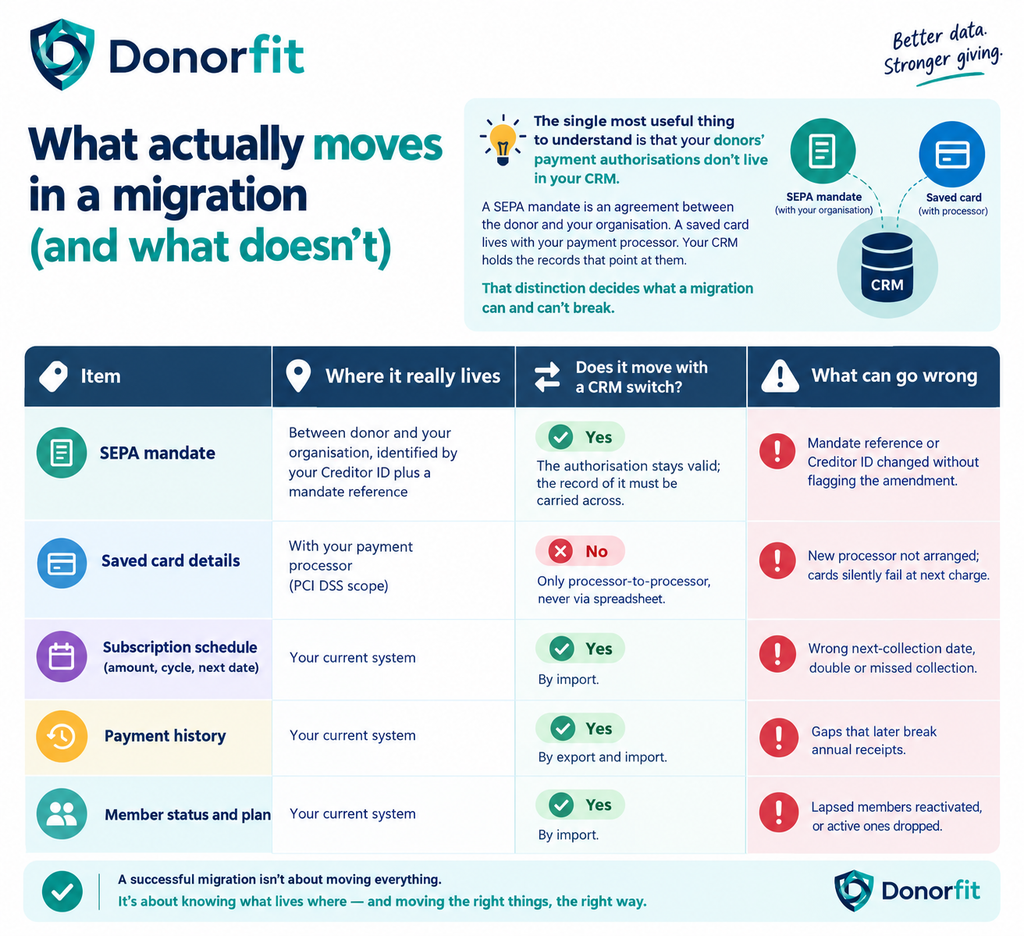
Read that table twice, and most of the anxiety goes. The donor’s permission to be charged doesn’t evaporate when you change software. What can break is the plumbing that points at it. In moving-house terms, the mandate is the tenancy agreement. You’re only changing the furniture, so the job is to make sure every forwarding address is filled in correctly.
SEPA mandate migration: keeping direct debits intact
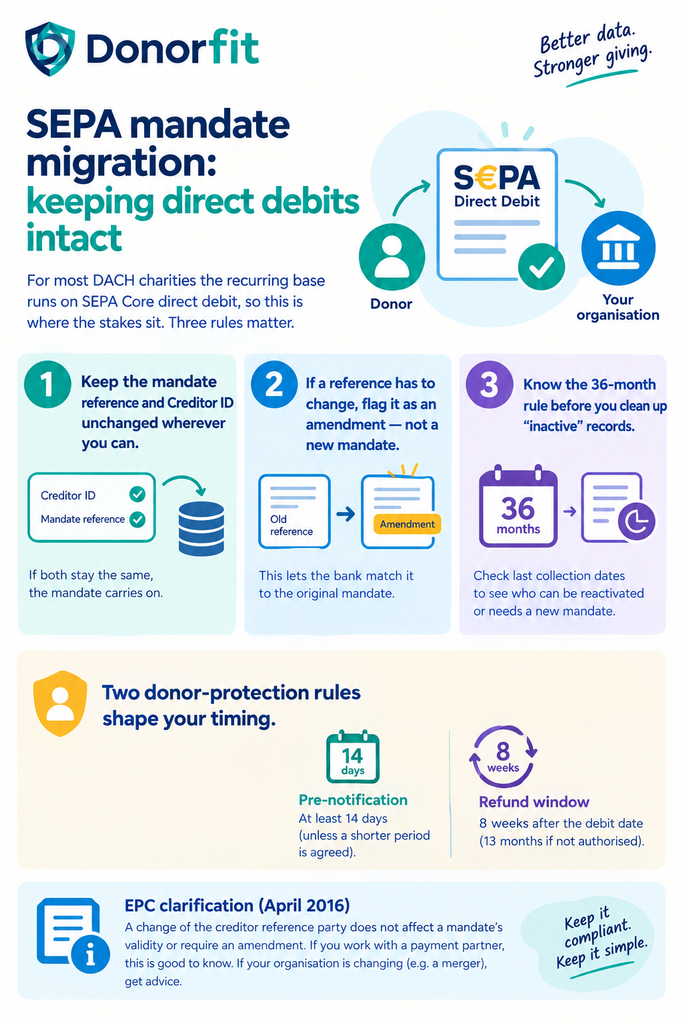
For most DACH charities, the recurring base runs on SEPA Core direct debit, so this is where the stakes sit. Three rules matter.
Keep the mandate reference and Creditor ID unchanged wherever you can. A SEPA mandate is identified by the combination of your Creditor Identifier and the unique mandate reference you assigned. If both stay the same in the new system, the mandate carries on as before. ING’s guidance on mandate amendments notes that when a creditor changes its administration, the existing Creditor ID and mandate IDs can remain the same. That is the cleanest path and the one to aim for.
If a reference has to change, flag it as an amendment rather than collecting a new mandate. Some systems generate their own reference formats. Under the SEPA Core scheme, a creditor-side change to the creditor name, Creditor ID or mandate reference is handled by setting the amendment indicator on the next collection, so the debtor’s bank can match it to the original mandate. ABN AMRO’s scheme leaflet confirms that a new signed mandate is generally not required for these creditor-side changes. Do this with your bank’s cash-management team, not by guesswork.
Know the 36-month rule before you clean up “inactive” records. A SEPA mandate that hasn’t been used for 36 months may no longer be used, as ABN AMRO’s direct-debit timelines spell out. When you migrate, carry the date of each mandate’s last collection across. It tells you which dormant supporters can be reactivated on their existing mandate and which need a fresh one.
Two donor-protection rules also shape your timing. Donors are normally entitled to at least 14 calendar days’ pre-notification of a collection unless you’ve agreed a shorter period, and under SEPA Core they can request a refund of an authorised direct debit for eight weeks after the debit date, extended to 13 months where a collection wasn’t authorised. Both are reasons not to rush a “catch-up” collection after a migration hiccup.
The European Payments Council clarified in April 2016 that changing the creditor reference party does not affect a mandate’s validity or require an amendment. If you work with a payment orchestrator or collecting partner, you should know this clarification. If your organisation itself is changing (a merger, say), the EPC defers to the underlying contract law, so get advice.
Card subscriptions: the part spreadsheets can’t carry
If SEPA mandates are the tenancy agreement, saved cards are the keys, and keys don’t go in the removal van. Full card numbers fall under PCI DSS and can’t be exported to a CSV and re-imported, nor should they be. Processors move them directly between each other. Stripe’s documentation, for example, says it will only transfer card data to another PCI DSS Level 1-compliant processor, and that its export covers card details and customer records but not payment history or subscriptions.
That last point catches people out. Even when the cards move cleanly, the subscription schedule, the amount and the history still have to come across separately. Plan for two tracks:
- Payment-method track: processor-to-processor card transfer, arranged by whoever holds the account.
- Subscription track: plan, amount, billing cycle, next charge date and history, imported into your new system and mapped to the transferred cards.
If you skip the second track, you have the keys and no idea which doors they open: cards on file and nothing telling the system when to charge them.
Don’t forget the annual receipt
For German charities, a mid-year migration has a consequence that’s easy to overlook. The Zuwendungsbestätigung you issue to a donor covers their giving for the year, and if January to June sits in the old system and July to December in the new one, the receipt has to combine both. Migrate the full payment history for the current tax year at a minimum, and check a few receipts end to end before you switch the old system off. Austrian and Swiss rules on donation reporting differ, so confirm the equivalent with your adviser.
Our earlier guide to consolidated annual donation receipts covers why a single combined receipt matters to members in more detail.
A practical sequence for recurring donor migration
The order you do things in matters more than the tool you pick. A good removal crew empties one house before filling the next, and a good migration works the same way. Here is a sequence that protects the next collection.
1. Freeze plan changes for the migration window. No new tiers, price changes or cycle changes in the old system once you’ve taken your export. If you’re planning to restructure tiers, do it after the move. Our guide on restructuring membership tiers without upsetting existing supporters shows how to do that without touching existing members.
2. Export everything, not just the active list. Active, paused, lapsed and cancelled subscriptions; mandate reference, Creditor ID and mandate signature date; last collection date; next scheduled collection; full payment history for at least the current tax year.
3. Run a reconciliation before importing. Count active subscriptions and total monthly recurring value in the old system. You’ll check the new system against these two numbers later.
4. Import into the new system and map statuses carefully. “Paused” in one tool can mean “cancelled” in another. Map each status explicitly.
5. Reconcile again. Same active count, same monthly recurring value. If they don’t match, stop and find out why before any collection runs.
6. Choose a cut-over date between collection runs. Pick a date after the old system’s last scheduled run and well before the new system’s first, leaving room for pre-notification.
7. Turn off collections in the old system before turning them on in the new one. A one-day delay is a hiccup. A double debit is a phone call, a refund request and, too often, a goodbye.
8. Watch the first cycle closely. Check returns and failed payments line by line for the first run. Most migration problems show up here, while they’re still small.
9. Tell donors only what they need to know. If nothing changes for them, a short note that you’ve updated your systems and their gift continues as before is enough. If a creditor name or reference does change, tell them clearly so the line on their bank statement doesn’t look unfamiliar.
Common migration mistakes
| Mistake | Why it hurts | How to avoid it |
| Regenerating mandate references on import | Debtor banks can’t match collections to the original mandate | Carry original references across, or flag amendments with your bank |
| Importing only active members | Lapsed history vanishes and annual receipts are incomplete | Export the full history for the current tax year at least |
| Running both systems’ collections in the same week | Double debits, refund requests, complaints | Switch old collections off before the first new run |
| Treating card migration as a CSV job | Not permitted under PCI DSS, and won’t work | Arrange processor-to-processor transfer |
| Skipping the reconciliation | Problems surface only when donors complain | Match active count and monthly recurring value before and after |
The bottom line
Most of what charities fear about switching systems lives in the gap between what they think moves and what actually does. Mandates hold. Cards travel by their own secure route. Schedules and history need a careful import and two honest reconciliations. Get those right, and on the first of the month your longest-standing supporter opens her banking app, sees the line that’s always there, and thinks nothing of it at all. That silence is what a successful migration sounds like.
Frequently asked questions
What does it mean to migrate recurring donors?
Migrating recurring donors means moving active recurring gifts, including the payment authorisation, billing schedule and payment history, from one fundraising or billing system to another, so that collections continue without the donor having to sign up again.
Do recurring donors need to sign a new SEPA mandate when we change CRM?
Generally no. The mandate is between the donor and your organisation, not your software. If your Creditor ID and the mandate reference stay the same, the mandate continues. If either changes, SEPA Core lets you notify the change through the amendment indicator on the next collection instead of collecting a new signature. Confirm the details with your bank.
Can we migrate recurring card donations to a new system?
Yes, but card numbers move directly between PCI DSS-compliant payment processors, not through your CRM or a spreadsheet. The subscription schedule and payment history are a separate import into your new system.
What happens to a SEPA mandate that hasn’t been used for a long time?
Under SEPA Core rules, a mandate that hasn’t been used for 36 months can no longer be used for collection. Carry each mandate’s last collection date across in your migration so you can tell which dormant supporters need a new mandate.
How do we avoid charging donors twice during migration?
Pick a cut-over date between collection runs, switch off scheduled collections in the old system first, and reconcile active subscription counts and monthly recurring value before the new system’s first run.
Does a mid-year migration affect annual donation receipts in Germany?
It can. A Zuwendungsbestätigung covering the whole year has to include gifts recorded in both systems, so migrate at least the current tax year’s payment history and test a few receipts before retiring the old system. This is general information, not tax advice.
Should we tell donors we’ve changed systems?
Only as much as affects them. If nothing changes on their bank statement or card, a short reassurance is enough. If the creditor name or reference changes, explain it plainly in advance.
Sources
- European Payments Council, Clarification Paper on the Change of Creditor or Creditor Reference Party, 8 April 2016 (summarised by Regulation Tomorrow).
- ING, SEPA Mandate Amendments (undated bank guidance).
- ABN AMRO, Mandate amendment SEPA Direct Debit Core scheme, November 2016.
- ABN AMRO, Timescales SEPA Direct Debit, accessed October 2026.
- Händlerbund, SEPA-Umstellung: SEPA-Mandat online erteilen, accessed October 2026.
- Stripe, Request a payment data export, accessed October 2026.
If you’re weighing a move and the members are what’s holding you back, Donorfit’s Import Subscriptions feature brings existing members and their subscription records across into the membership module, so billing carries on from where it left off. See how it works